Scriptorium — free medieval notation layout editor
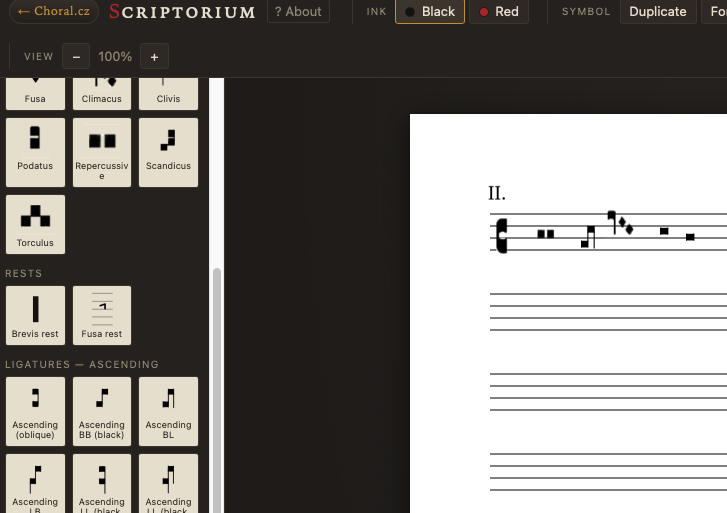
Scriptorium is a free, browser-based editor for creating mensural notation and other historical musical notations.
It is intended for musicians, musicologists, teachers, students, manuscript reconstruction, historical interpretation and experimental work with early musical notation.
No installation or registration is required. Projects can be saved locally as JSON files and reopened later.
What is Scriptorium for?
In Scriptorium, you can create a musical notation in black mensural notation, during later the possibility of creating neumes and white mensural notation will be added. As a special treat, we will add Ugaritic cuneiform notation.
What you can create in scriptorium
In Sriptorium you can create a musical notation in black mensural notation, neumes and white mensural notation.
Who is Scriptorium intended for
For everyone who needs to prepare a high-quality graphic typesetting of historical musical notation – musicologists, performers, teachers, students of early music, publishers and experimental creators.
Is Scriptorium a regular notation program?
No. Scriptorium is a graphic editor of historical musical notation. You place individual symbols manually, similar to a scribe or typesetter. The program does not check the musical correctness of the notation, does not play it back and does not automatically calculate the rhythm or pitch.
Can Scriptorium work with MIDI?
No. Scriptorium is not a converter between modern notation and historical notation systems. Mensurate and other historical notations are context-dependent in meaning, and their symbols cannot be reliably translated to MIDI at a 1:1 ratio. Manual typesetting therefore provides greater accuracy and control than automatic import or export.
Do I need to be able to read mensurate notation?
No, to use Scriptorium. However, to create historically and musically correct notation, you need to know the rules of the notation you are using. Scriptorium is a typesetting tool, not an automatic textbook or correctness checker.
How to use Scriptorium
Using Scriptorium is very simple and intuitive. On the left side, you select the symbol you need and then click to place it on the staff. You can then move it as you wish. We have chosen the option of combining black and red symbols. The tools on the right allow you to set various parameters for the staff and individual symbols.
Does Scriptorium store my projects or personal data?
No. Projects or any other information are not stored on our server. You save the working file in JSON format to your own device and can open it again later. Scriptorium does not require registration.
Does Scriptorium save your work automatically?
No. We therefore recommend that you regularly save your working file in JSON format, especially when working on a larger page.
What if I want to return to the writing later?
We recommend saving each finished or unfinished writing to your local disk.
How to save a written musical notation
Internally, it saves in JSON format, from which you can reload the unfinished writing at any time and continue changing and editing it. If you want a finished output, use the Export to SVG or PNG function. You will get an image with the musical notation. You can print it, insert it into other materials, books, etc. You can set its resolution as you wish in the right column.
What is the difference between SVG, PNG and JSON? Which format should I use?
JSON is used to save a project in progress and its further editing. SVG is a vector output suitable for printing, book typesetting and other graphic processing. PNG is a raster image suitable for quick use on the web, in a presentation or in a regular text editor.
What if I want to add text to the musical notation?
It is best to export the finished notation as SVG and insert it into a DTP or graphics program where you can type the text as a separate layer. For simpler documents, PNG can also be used. Separating the notation and text gives you maximum freedom in typesetting and allows you to easily edit or translate the text later.
Can I further edit the exported SVG?
Yes. SVG can be opened in vector editors, such as Inkscape, Affinity Designer or Adobe Illustrator, and further change its size, colors or individual graphic elements.
On which devices does Scriptorium work?
Scriptorium is intended primarily for use on a computer in a modern internet browser. It can also be opened on a tablet or phone, but precise placement of a large number of symbols is more convenient with a mouse or trackpad.
Can Scriptorium be used without an internet connection?
Scriptorium is a web application and is normally opened in an internet browser. After loading, some functions can work locally, but for reliable use, we recommend an internet connection.
Is Scriptorium intended for typesetting an entire book?
Yes, but it is important to note that Scriptorium creates individual pages or separate musical notations. You can then compile the finished outputs into a book, worksheet or other document in a DTP program or text editor.
This is also related to the text. Scriptorium does not replace InDesign or Affinity Publisher.
What if I need to use a symbol or type of historical notation that is not on the menu?
Simply write to us using the form at the bottom of this page. We are still working on Scriptorium and are trying to make it contain everything you need. Attach a photo or a link to a historical source and briefly describe what you need the symbol for. We can include well-documented symbols in one of the other versions
Is Scriptorium really free to use and can I freely use its outputs for commercial purposes?
Yes. You can use Scriptorium for free and you can use the created outputs in personal, educational and commercial projects. Listing Scriptoria as a use of the tool we are happy to use, but it is not mandatory.
The free license applies to the created outputs, not to copying, further distribution or sale of the application itself or its symbol library.
At the same time, please note that the license to use Scriptorium is not related to the copyrights that may apply to the music you record. The authors and operators of Scriptorium bear no responsibility for how you use it.
Who is behind the Scriptorium project?
Scriptorium is an independent private project of musician and music theorist Tomáš Houška.
How is Scriptorium financed?
Scriptorium is an independent project without grant or institutional funding. We support its development with the proceeds of our books, courses and historical games. You can find the books in the Eshop section.
Can I support Scriptorium?
The best way to support the project is to purchase one of our books, participate in a medieval singing course or in one of our historical LARPs. It will also help if you recommend Scriptorium to other musicians, educators, students, and researchers.